


The UK's New Subscription Rules Are Coming: What Retention Teams Need to Know


The UK’s new subscription rules will require clear terms, renewal reminders and straightforward cancellation. Is your business ready?
The new rules start in January 2027. Before then, businesses should review how they sell, renew and cancel subscriptions for UK customers.
The rules come from the Digital Markets, Competition and Consumers Act 2024 (DMCCA). They cover what you tell customers before they sign up, reminders before payments, cancellation, and the right to cancel and get money back within 14 days. If a customer signed up online, they must be able to cancel online.
If you sell subscriptions for products, services or digital content to UK consumers, the rules may apply to you, though some types of subscription are excluded. Read on to see how they affect your checkout, billing emails and cancellation flow.
Disclaimer: This article provides general information and does not constitute legal advice. Consult your legal or compliance team when implementing subscription policies and practices. Research reviewed October 2026.
No. The rules cover subscriptions sold to individual consumers, not to businesses. They include ongoing subscriptions and free or discounted trials that turn into paid plans.
Some types of subscription are excluded, so have your legal team confirm which of your offers are covered. DMCCA, sections 254 and 255.
Overview of the UK subscription rules
The rules aim to help customers understand what they are signing up for, know when a payment is coming, and leave a subscription without unnecessary hurdles.
In August 2026, the government announced that the rules would start in January 2027, earlier than the spring date it had planned. Plan around January. The government has not yet said how the rules will treat subscriptions that started before then, or whether businesses will get extra time to comply.
In short, businesses will need to:
Explain the subscription before signup. Tell customers the key details, such as the price, how often they will pay, how long they are committed and how to cancel.
Send payment reminders. Remind customers before their first paid charge after a free or discounted trial. After that:
If you charge more often than every six months, such as monthly, send a reminder about every six months.
If you charge every six months or less often, such as yearly, send a reminder before each renewal.
Make cancelling easy. Customers must be able to cancel without unnecessary steps. If they signed up online, they must be able to cancel online.
Give customers 14 days to change their mind. Customers can cancel and get a refund:
Within 14 days of signing up.
Within 14 days after a free or discounted trial turns into a paid plan.
Within 14 days after a subscription renews for a year or more. Send customers a notice when each of the last two windows opens.
Here’s how each requirement affects your business.
Which subscriptions are covered?
Start by listing your subscription offers for UK consumers, including free trials and introductory discounts that turn into paid plans.
For each offer, write down:
How long the customer is committed.
How often you take payment.
Any free or discounted introductory period.
How and when the subscription renews.
These details matter more than a label such as “monthly” or “annual.” A plan billed monthly can still lock the customer in for a year.
Because some subscriptions are excluded, have your lawyer confirm which plans are covered before you apply the same policy to all of them.
Subscription signup and the UK rules
Before a customer signs up, you must give them the key details of the subscription.
The goal is simple: the customer should understand what they are agreeing to before they agree.
Clear subscription information
Check how your checkout explains:
The price and how often the customer pays.
How long they are committed.
What happens when a free or discounted period ends.
How the subscription renews.
How to cancel.
Have your legal team confirm the full list of required details and how they must be shown.
For example, if you advertise an annual plan with a monthly price, make the one-year commitment clear. If you offer an introductory discount, say what the price will be afterward and when it starts.
Check checkout on mobile as well as desktop. Details that are easy to spot on a large screen can be missed on a phone.
Consistent subscription terms
Your checkout, confirmation and account page should describe the subscription the same way.
If checkout calls a plan monthly but the account page shows a one-year commitment, customers may only find out when they try to cancel. Fix that before it reaches support or your cancellation flow.
Renewal reminders
The law requires two kinds of reminders:
When a trial ends: a reminder before the first paid charge after a free or discounted trial.
For ongoing payments: a reminder about once every six months, before a renewal payment.
Here’s what that means for common plans:
Plan | Reminders required |
|---|---|
Monthly | One before a payment around month 6, and another around month 12. That’s about two a year, not one every month. |
Quarterly | One before the payment around month 6, and another around month 12. Also about two a year. |
Annual | One before each yearly renewal. That’s one a year. |
30-day free trial, then monthly | One before the first paid charge when the trial ends, then about every six months, the same as a monthly plan. |
How far ahead of the payment to send each reminder, and what it must say, will be set in rules that haven’t been published yet.
To prepare, list every billing event that will need a reminder. For each one, note:
What triggers the reminder.
Which customer gets it.
Which team is responsible for sending it.
Where the customer can cancel.
Have legal confirm the timing and wording before you automate the reminders.
Test what happens when a customer pauses, switches plans or extends a trial. These can change the next payment date, so a reminder based on the original signup date may go out at the wrong time.
Subscription cancellation and the UK rules
Easy cancellation is at the heart of the new rules.
Customers must be able to cancel without unnecessary steps. If they signed up online, they must be able to cancel online, and the instructions must be easy to find.
In the UK, many subscriptions are paid by Direct Debit, which lets a business take payments straight from the customer’s bank account. Customers can stop a Direct Debit through their bank, but the government says that doesn’t count as cancelling the subscription. So you can’t send customers to their bank instead of giving them a way to cancel with you.
Go through your cancellation flow as a customer who has already decided to leave.
Can they find the cancel button, finish the process, and understand what happens to their billing and account access?
Review every step, including surveys, offers and confirmation screens. Have your lawyer review each test version of the flow, not just the main one.
Retention offers and feedback
You can still show retention offers and ask why customers are leaving. But customers must be able to skip them and finish cancelling, and you shouldn’t show offer after offer. The government hasn’t said how many offers is too many. Official guidance on that is expected.
In practice, let customers skip feedback, and give them a clear way to say no to an offer and finish cancelling.
A pause offer can help a customer who has more product than they need right now. But someone who wants to cancel should still be able to cancel easily.
Cooling-off periods and refunds
A cooling-off period is a window in which the customer can change their mind, cancel and get a refund, which may be partial.
Customers get 14 days to cancel after they sign up. For physical products, the 14 days usually start when the first delivery arrives, not when they sign up.
The law also adds a second 14-day window:
After a free or discounted trial ends and the regular price starts.
After a renewal that commits the customer to another year or more.
You must send customers a notice when each of these windows opens.
Handling cooling-off requests
Turning off the next renewal and cancelling within a 14-day window are different requests and may need different handling. Support teams need to tell them apart and send each to the right billing and refund process.
How refunds will work
The law already sets two basics: customers can’t be charged a fee for cancelling within a 14-day window, and you must refund money they no longer owe. The detailed refund rules will come in regulations that haven’t been published yet.
In April 2026, the government said it plans to require:
Services and digital content: a refund for the part of the subscription the customer hasn’t used. Customers who start using digital content right away usually lose the 14-day signup window.
Physical products: a full refund once returnable goods are sent back. For perishable or made-to-order goods, you can deduct the value of what was already delivered.
Timing: refunds paid within 14 days of the cancellation, or of getting the goods back.
Use this to plan your refund process, but wait for the final rules before setting exact amounts.
For ecommerce subscriptions, bring your fulfillment team in. Support needs to know whether an order has been delivered and how a return changes the refund.
For digital subscriptions, make sure account access and refunds follow the same approved policy.
Prepare your cancellation program with ProsperStack
A good cancellation experience lets customers leave easily while still giving you a chance to offer relevant, optional alternatives.
ProsperStack’s Instant cancel step gives customers an immediate option to cancel at the start of the flow, alongside feedback and an optional retention offer.
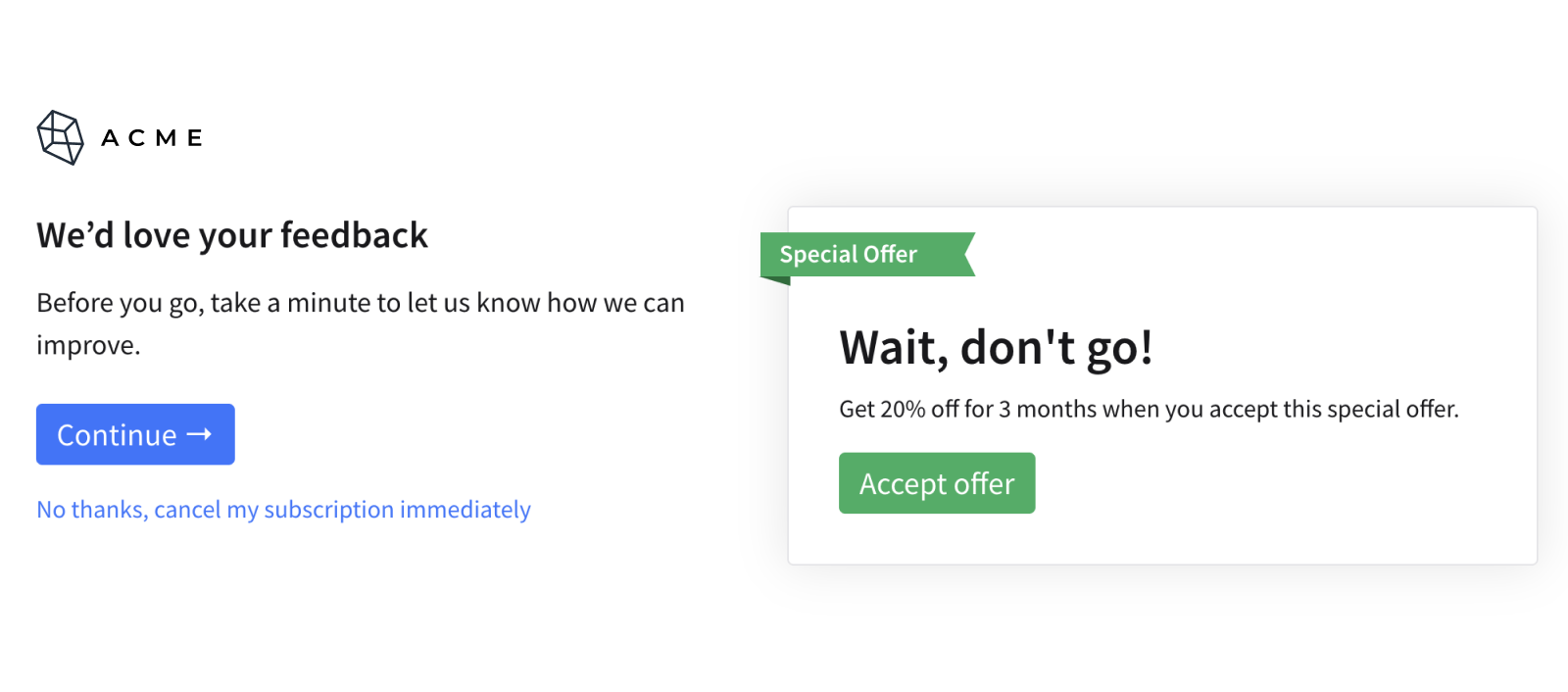
ProsperStack also supports one-click cancel: a persistent link that lets subscribers cancel immediately from any step in your cancellation flow. You can enable it for all subscribers or specific customer segments.

ProsperStack’s cancellation flows support targeted offers, exit feedback and experimentation. Feature support varies by billing platform, and your business is still responsible for following the law across signup, reminders, cancellation and refunds.
Check one plan from start to finish
Pick your most popular plan and go through it the way a customer would:
Sign up. Are the price, commitment and how to cancel clear before payment?
Check the reminder. Will one go out before the next payment?
Cancel online. Can you finish without accepting an offer or answering a survey?
Ask for a refund within 14 days. Does support know what to do, and does billing refund the right amount?
Once your cancellation flow is approved, test retention offers within it. Track later payments, refunds and complaints, not just how many customers accept an offer, to see whether an accepted offer actually keeps customers.
Get a demo to discuss how ProsperStack can support your cancellation program.
Check your readiness
Answer yes or no for each question. Every “no” is something to change before the rules start in January 2027.
Who the rules cover
1. Do you sell subscriptions to individual consumers in the UK?
The rule: The rules cover subscriptions sold to individuals buying mainly for personal use. Business customers aren’t covered, and some types of subscription are excluded.
How to comply: If yes, keep going. If you’re not sure, have your lawyer confirm which plans are covered.
2. Do you sell any UK subscriptions through the App Store or Google Play?
The rule: The government hasn’t said how the rules apply when an app store handles billing and cancellation. The law puts the responsibility on your business, even when someone else acts on your behalf.
How to comply: If yes, ask your lawyer how the rules apply to those subscriptions.
Signup
3. Before customers pay, does checkout show the price, how often they pay, how long they’re committed and how to cancel?
The rule: You must give customers the key details of the subscription before they sign up.
How to comply: If no, show these details together at checkout, before the customer pays. Have your legal team confirm the full list of required details.
4. If you show a monthly price for an annual plan, does checkout clearly say it’s a one-year commitment?
The rule: Customers must understand what they’re committing to before they sign up.
How to comply: If no, put the one-year commitment right next to the monthly price.
5. Do your checkout, confirmation email and account page describe each plan the same way?
Why it matters: If one page says “monthly” and another shows a one-year commitment, customers often find out only when they try to cancel.
How to comply: If no, make the plan name, price and commitment match everywhere customers see them.
Payment reminders
6. Do you send a reminder before the first paid charge after a free or discounted trial?
The rule: The law requires a reminder before the first payment after a free or discounted trial ends.
How to comply: If no, add a reminder before that first paid charge. The exact timing and wording will be set in rules that haven’t been published yet.
7. For plans you charge more often than every six months, such as monthly, do you send a reminder about every six months?
The rule: For ongoing payments, the law requires a reminder about once every six months, before a renewal payment. For a monthly plan, that’s about two reminders a year.
How to comply: If no, set up a reminder about every six months, sent before a renewal payment.
8. For plans you charge every six months or less often, such as yearly, do you send a reminder before each renewal?
The rule: Under the same six-month rule, these plans need a reminder before each renewal payment.
How to comply: If no, send a reminder before every renewal.
9. Do reminder dates update when a customer pauses, switches plans or extends a trial?
Why it matters: Reminders must go out before the payment. If dates are based on the original signup date, a pause or plan change can send them at the wrong time.
How to comply: If no, base reminder dates on the next real payment date.
Cancellation
10. Can customers who signed up online cancel online, without calling, chatting or emailing you?
The rule: Customers who signed up online must be able to cancel online, without unnecessary steps.
The government says: Giving customers only an email address to cancel is unlikely to count as online cancellation. How to comply: If no, add an online way to cancel, such as a cancel button or form in the account or app.
11. Can customers skip your cancellation survey and still cancel?
The government says: Businesses can ask for feedback when customers cancel. But customers don’t have to give it to cancel, and asking for it shouldn’t block or slow down cancelling. The government plans to confirm this in official guidance.
How to comply: If no, make the survey optional and give customers a direct way to finish cancelling. ProsperStack’s Instant cancel step provides an immediate cancellation option at the start of the flow, alongside optional feedback and a retention offer.
12. Can customers say no to a retention offer and finish cancelling, without being shown offer after offer?
The government says: Businesses can show retention offers when customers cancel. But offers shouldn’t block or slow down cancelling, and businesses shouldn’t show an unreasonable number of them. The government hasn’t said how many is too many, and plans to confirm this in official guidance.
How to comply: If no, let customers decline an offer once and finish cancelling. Keep a cancellation action available throughout the flow. ProsperStack’s one-click cancel adds a persistent link that lets customers cancel immediately from any step. Have your legal team review the configured experience, including test variants.
13. Do you give customers your own way to cancel, rather than telling them to stop payment at their bank?
The government says: Stopping a Direct Debit at the bank stops the payment but doesn’t end the subscription. It doesn’t count as a way to cancel.
How to comply: If no, give customers a way to cancel with you directly.
14-day windows and refunds
14. Can your support team tell the difference between “turn off my renewal” and “cancel and refund within 14 days”?
The rule: Customers can cancel and get a refund within 14 days of signing up, after a trial turns into a paid plan, and after a renewal of a year or more. Turning off renewal only stops the next charge, while cancelling in a 14-day window ends the subscription now.
How to comply: If no, train support to recognize both requests and route each to the right billing process.
15. Can your billing system refund part of a payment, such as the unused part of a subscription?
The rule: The government plans to require refunds for the unused part of services and digital content. The final rules haven’t been published yet.
How to comply: If no, make sure billing can issue partial refunds. Check the final rules before setting amounts.
16 Will you send a notice when the 14-day window opens after a trial turns paid, or after a renewal of a year or more?
The rule: The law requires a notice when each of these windows opens. It must explain how to cancel and what refund the customer can get.
How to comply: If no, set up a notice that goes out when each window opens.
18. For physical products, can support see when an order was delivered and whether it was returned?
The rule: For physical products, the 14 days usually start when the first delivery arrives, and the refund depends on whether the goods come back.
How to comply: If no, give support access to delivery and return information.
If you answered no to any of questions 10 to 13, ProsperStack’s cancellation flows can help. They give customers a clear way to cancel online, with offers and surveys they can skip. Get a demo.


